

Vehicle IDs (sirens, modkits, lights)
Does a car flash the wrong emergency lights, get another car’s tuning parts, or the wrong headlights in game? Usually two vehicles share one ID, and the game uses only one of the two. Vehicle IDs finds those clashes and gives each vehicle its own number.
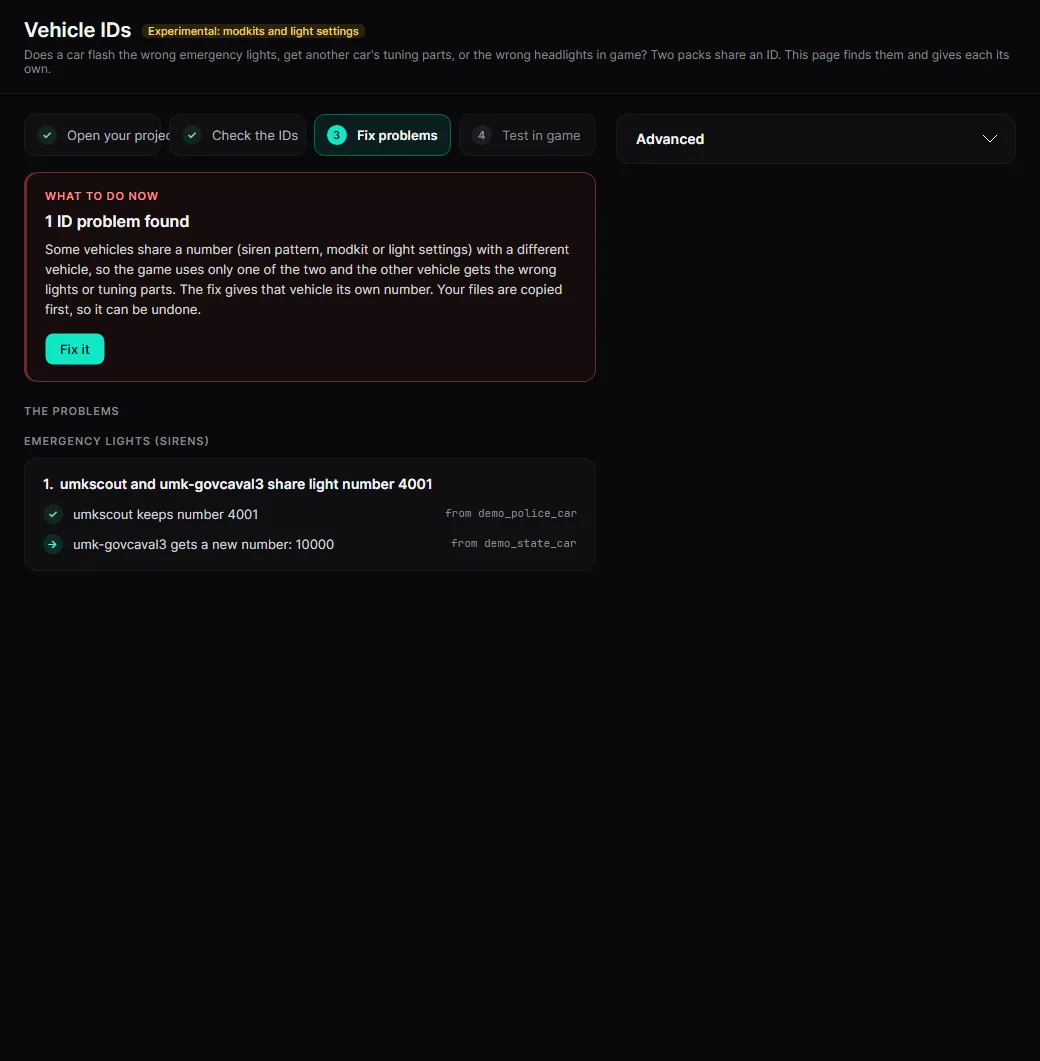
Open a vehicle project and click Vehicle IDs in the toolbar (or Vehicles → Vehicle IDs). The page walks you through four steps: Open your project, Check the IDs, Fix problems, Test in game.
What it checks
Section titled “What it checks”| ID | Where it lives | What goes wrong when two vehicles share it |
|---|---|---|
| Siren ID | carcols.meta (siren sets), picked in carvariations.meta |
The wrong emergency light pattern. |
| Modkit (Experimental) | carcols.meta under <Kits>, picked by name in carvariations.meta |
Another car’s tuning parts. |
| Light settings ID (Experimental) | carcols.meta under <Lights> |
The wrong headlights and indicators. |
Check your vehicles
Section titled “Check your vehicles”Click Check my project, or Check another folder… to check any folder of vehicle resources. It takes a few seconds and changes nothing.
The result is one of:
- All lights are fine in … Every vehicle has its own numbers (siren setups, modkits and light settings).
- N ID problems found, listed under THE PROBLEMS. Each one says which vehicle keeps its number and which gets a new one.
- No vehicle IDs found. None of the vehicles has a
carcols.metawith sirens, modkits or light settings. Pick the folder that holds your emergency vehicles.
ALSO NEEDS A LOOK lists problems the studio cannot fix for you, for example:
- has a carcols.meta with siren sets, but the fxmanifest has no data_file ‘CARCOLS_FILE’ line, so the sirens never load. Add that line to the resource’s
fxmanifest.lua. - has a carvariations.meta, but the fxmanifest has no data_file ‘VEHICLE_VARIATION_FILE’ line… Same fix, other line.
- … has N lights; the game only uses the first 20.
The same set shipped twice with identical content is not a problem. It is listed under the notes as Harmless: every copy flashes the same.
Fix the clashes
Section titled “Fix the clashes”- Click Fix it (one problem) or Fix all.
- Read what will change and confirm.
Each clashing vehicle gets a new, unused ID in its carcols.meta and in the carvariations.meta that points to it. Nothing else in the files changes. Every changed file is copied first, and each fix is a step in History.
Test in game
Section titled “Test in game”The game reads these settings only when a resource starts. Put the changed files on your server if they are not there yet, restart those resources (or the server), and look at the car. Still wrong? Click Check again.
Compare with the rest of your server
Section titled “Compare with the rest of your server”Open Advanced and tick Also compare with the rest of my server. The studio then also finds packs elsewhere on the server that use the same numbers as yours. Only clashes that involve your vehicles are shown, and only your vehicles get new numbers.
Tick Include resources that server.cfg does not start when your vehicles are started some other way (txAdmin, a script).
Set a siren ID by hand
Section titled “Set a siren ID by hand”With Advanced open, EVERY LIGHT SETUP lists every siren set with its ID. Type a number in the box next to one and click Set. Numbers that are already in use are refused.
Undo your fixes
Section titled “Undo your fixes”Advanced → Undo my fixes… puts every changed file back as it was. You can also undo single fixes in History (filter Vehicle IDs).
Limits
Section titled “Limits”| What | Limit |
|---|---|
| Lights in one siren set | The game uses the first 20. |
| New siren IDs | Start at 10000. |
| Modkit IDs | Up to 65535. New ones start at 5000, clear of the game’s own kits. |
| Light-settings IDs | Up to 255. Fixes use the highest free numbers, so few are left. |
The studio also reads the game’s own modkit and light IDs from your GTA V install, so it can see clashes with base-game cars. Without GTA V installed it says so and skips those.
Next: Meta editor and versions.