

Build a vehicle resource
Build packages your models and textures into a new FiveM resource you can drop on your server: a stream folder with your files and an fxmanifest.lua. It can shrink textures on the way. The same page builds vehicle, MLO and loose-file resources.
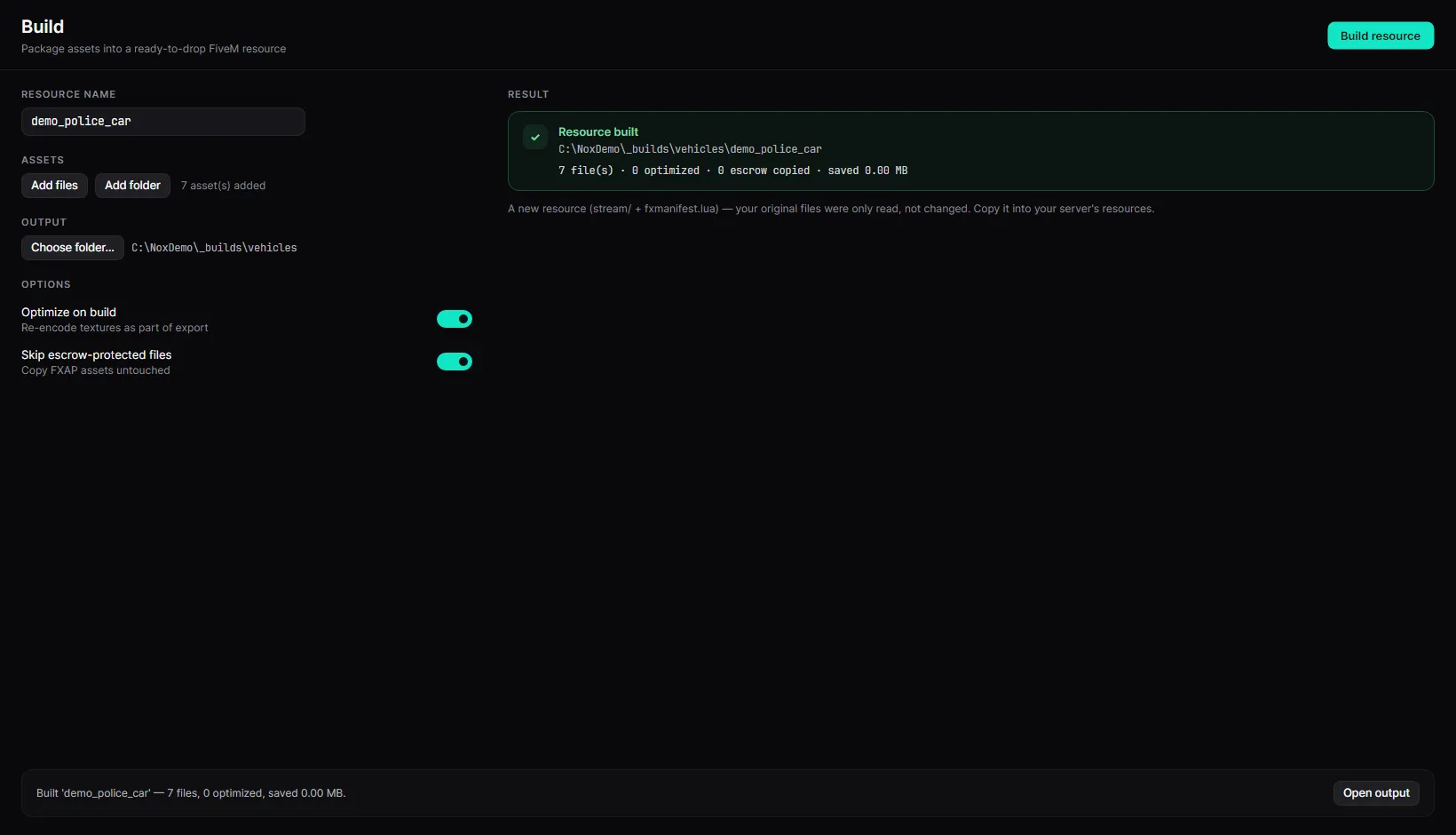
Open your project and click Build in the toolbar (or Project → Build).
Build the resource
Section titled “Build the resource”-
Under RESOURCE NAME, type the name of the resource, for example
my_police_car. This is also the folder name and the name youensureon the server. -
Under ASSETS, click Add files or Add folder, or drag files and folders onto the page. The page takes
.ytd,.ydr,.yddand.yftfiles. When you add a folder, its sub-folders are kept insidestream. -
Check OPTIONS (below).
-
Under OUTPUT, keep the default folder or click Choose folder…. The resource gets a folder of its own inside it.
-
Click Build resource.
The result card says Resource built, with the folder, how many files were copied and optimized, and how much space was saved. Click Open output to open the folder.
Options
Section titled “Options”| Option | What it does |
|---|---|
| Optimize on build | On by default. Textures are re-encoded as they are copied, so the resource streams faster. See Optimize. |
| Skip escrow-protected files | On by default. Escrow-protected (FXAP) files cannot be read, so they are copied as they are, untouched. |
Your original files are only read, never changed.
What you get
Section titled “What you get”my_police_car/ fxmanifest.lua stream/ my_police_car.yft my_police_car_hi.yft my_police_car.ytdFiveM streams every file in stream by itself, so fxmanifest.lua only needs the basics. Building again with the same name replaces stream and fxmanifest.lua, and keeps anything else you added to the folder, such as scripts.
Add your meta files
Section titled “Add your meta files”Build copies models and textures only. A vehicle also needs its .meta files (vehicles.meta, carvariations.meta, carcols.meta, handling.meta) and a data_file line for each in fxmanifest.lua. Copy them into the built resource and add the lines, for example:
files {    'data/vehicles.meta',    'data/carvariations.meta',    'data/carcols.meta',    'data/handling.meta',}
data_file 'VEHICLE_METADATA_FILE' 'data/vehicles.meta'data_file 'VEHICLE_VARIATION_FILE' 'data/carvariations.meta'data_file 'CARCOLS_FILE' 'data/carcols.meta'data_file 'HANDLING_FILE' 'data/handling.meta'
Put it on your server
Section titled “Put it on your server”-
Copy the resource folder into your server’s
resourcesfolder. -
Add a line to
server.cfg, after your framework:ensure my_police_car -
Restart the server, or type
refreshand thenensure my_police_carin the server console.
Free builds
Section titled “Free builds”On the free plan, each build uses one of your 8 FiveM builds per computer. The page shows how many are left, for example Free plan · 5 of 8 free builds left, with an Upgrade button. With a license, builds are unlimited. See The free plan.
Good to know
Section titled “Good to know”- With a project open, the default output folder is
<project folder>-builds, next to your project’s folder. The folder you choose is remembered for the project. - A build that fails part-way leaves the previous build as it was.
- Before you build, Validate finds files that are too big to stream or will not load.
Next: Interior files.