

What's new
What changed in each version of Noxsware Studio, newest first. The studio updates itself and shows this list once after each update, in the What’s new in Noxsware Studio window.
Tools marked (Experimental) are new and not tested in game yet. Try them on a copy of your pack first; History can undo what they change.
1.6.0 (10 November 2026)
Section titled “1.6.0 (10 November 2026)”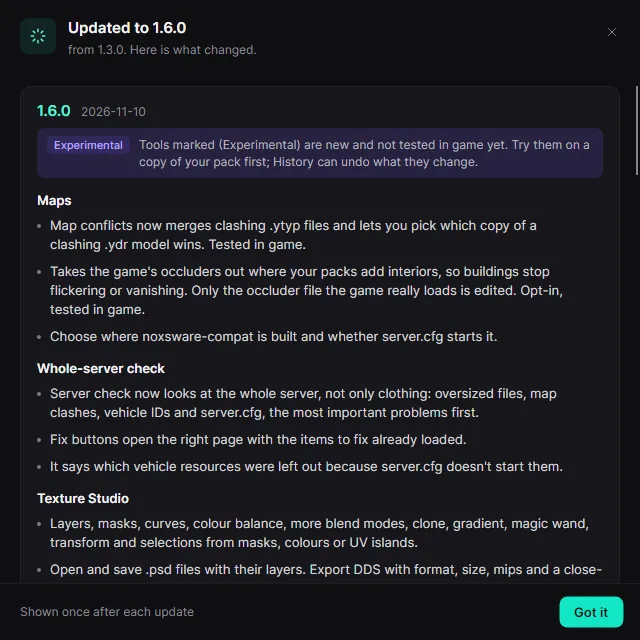
Maps
- Map conflicts now merges clashing
.ytypfiles, and lets you pick which copy of a clashing.ydrmodel wins. Tested in game. - It can take the game’s occluders out where your packs add interiors, so buildings stop flickering or vanishing. Opt-in, tested in game.
- Choose where the
noxsware-compatfix resource is built and whetherserver.cfgstarts it.
Whole-server check
- Server check looks at the whole server, not only clothing: files too big to stream, map clashes, vehicle IDs and
server.cfg, the most important problems first. - Fix buttons open the right page with the items to fix already loaded.
Texture Studio
- Layers, masks, curves, colour balance, more blend modes, clone, gradient, magic wand and more selections.
- Open and save
.psdfiles with their layers. Export DDS with format, size and mipmaps. - Tested in game, no longer Experimental. See Texture Studio.
Model Studio
- Blender-style toolbar, modes and shortcuts; wireframe, x-ray and clay views.
- Undo across every edit, checks before saving, autosave, weight tools, Remake LODs and Fix everything.
- Tested in game, no longer Experimental, except Fit to body (Experimental). See Model Studio and Blender.
Edit in other programs
- Edit in Blender… with the Noxsware add-on: changes, including painted colours, come straight back into the studio.
- Edit in another program on a colour’s right-click menu finds Photoshop, GIMP, Krita and Paint.NET. Edits keep the texture’s format, size and mipmaps.
Also new
- Cloth physics preview runs on the piece’s own
.ylddata, the ped’s body and its animation. Tested in game. - One Vehicle IDs page for sirens, modkits and light settings, with a clash check and renumber.
- A livery saved in Texture Studio shows on the car right away.
- Animation projects are their own project kind.
- FiveM Enhanced (Experimental): build for Legacy and Enhanced in one run, and check a whole server’s readiness.
- Add clothes takes
.ydd.xmlfiles. Pieces without a colour file come in hidden. - The menu bar is grouped into Project, Vehicles, Clothing and Tools.
Fixed
- Exported animations start where the ped stands, and additive clips face forward.
- Cloth pieces follow the body in clips instead of flying apart.
- Skin tone tints only bare skin.
- A
.ytypis never written in a form the game can’t read.
1.5.0 (25 October 2026)
Section titled “1.5.0 (25 October 2026)”New look
- Every screen redesigned. Light and High contrast themes, accent colours, and six more languages.
- Drag tabs to reorder them.
Free plan
- Use the studio without a key: everything to look at and check, plus 8 FiveM builds per computer. See The free plan.
New tools
- Animation creator (Experimental): pose the ped bone by bone or by dragging hands and feet, key poses on a timeline, and export a
.ycdor a ready FiveM resource. - Model Studio (Experimental): move vertices, push clothing out from the body, sculpt, shrinkwrap and paint weights.
- Mass edit: rename, renumber, change effects or move many pieces as one undo step.
- Shop details for each piece (label, price, shop, tags), with exports for shop scripts.
- Colourways in a batch, normal and shine maps made from a colour, and Colours by name.
- Validate can ignore a finding, and Fix all fixes everything as one undo step.
- Coming from Durty? Bring Durty-built resources and projects in.
- Search the game’s animation clips, T-pose and A-pose, body presets, any ped in Ped Preview, and a sound picker.
- New livery… adds a car’s next livery and opens it in Texture Studio.
- Team sharing for the Studio plan (Experimental).
- Connect Claude Code or Claude Desktop to drive the studio. See AI assistants.
- Duplicate clothing and Store media are no longer Experimental.
1.4.0 (21 October 2026)
Section titled “1.4.0 (21 October 2026)”- Ped Preview: light and look presets (Studio, Daylight, Golden hour, Night), skin tone, hair colour, wireframe, lower detail levels, wet, dirt and blood, and car headlights and a torch for night tests.
Ctrl+Kfinds any page, tool or piece. Set your own keyboard shortcuts in Settings.- Czech language.
- Import Menyoo outfits (
.xml). - Server check: your whole server in one report, worst problems first.
- Texture Studio (Experimental): paint colours inside the studio and watch the ped or car change.
- Also Experimental: live edit in your picture editor, Recolour, fewer polygons and detail levels, 3D export (
.glb), tattoo placement, singleplayer and FiveM Enhanced builds, cloth physics preview, In-game Inspector, Server tools, Clipping check, Department kits, Pack update and Store media.
1.3.0 (15 October 2026)
Section titled “1.3.0 (15 October 2026)”- The studio updates itself: it downloads new versions and installs them when you restart or close it. After an update, the What’s new window shows what changed.
- Right-click a piece to export the model, the model with its colours, XML for Blender and CodeWalker, or its textures as PNG or DDS.
- Replace model…, Replace with dummy… and Textures inside the model… work without a build. History can undo every replace.
- Right-click a colour: Replace…, Export (.ytd)… and Export as XML….
- Ped Preview: the female ped has a woman’s face,
.ycdanimations play correctly, and a new test animation, Jazz hands.
1.2.0 (5 October 2026)
Section titled “1.2.0 (5 October 2026)”- Blender (XML): turn game files into CodeWalker/Sollumz XML and back:
.ytd,.ydd,.ydr,.ybn,.yft,.ymap,.ytypand.ymt.
1.1.3 (3 October 2026)
Section titled “1.1.3 (3 October 2026)”- Pictures (
.png,.jpgand others) become colours. Choose BC7 for the best quality or DXT for smaller files. - Right-click a colour to optimize it. A badge shows which colours are already optimized.
- Select several pieces with
CtrlorShiftand delete them together. - Ped Preview: smoother animations, and import your own
.ycdanimations.