

Install and activate
This page takes you from the website to an open studio: get a plan, download the app, start it once and activate it.
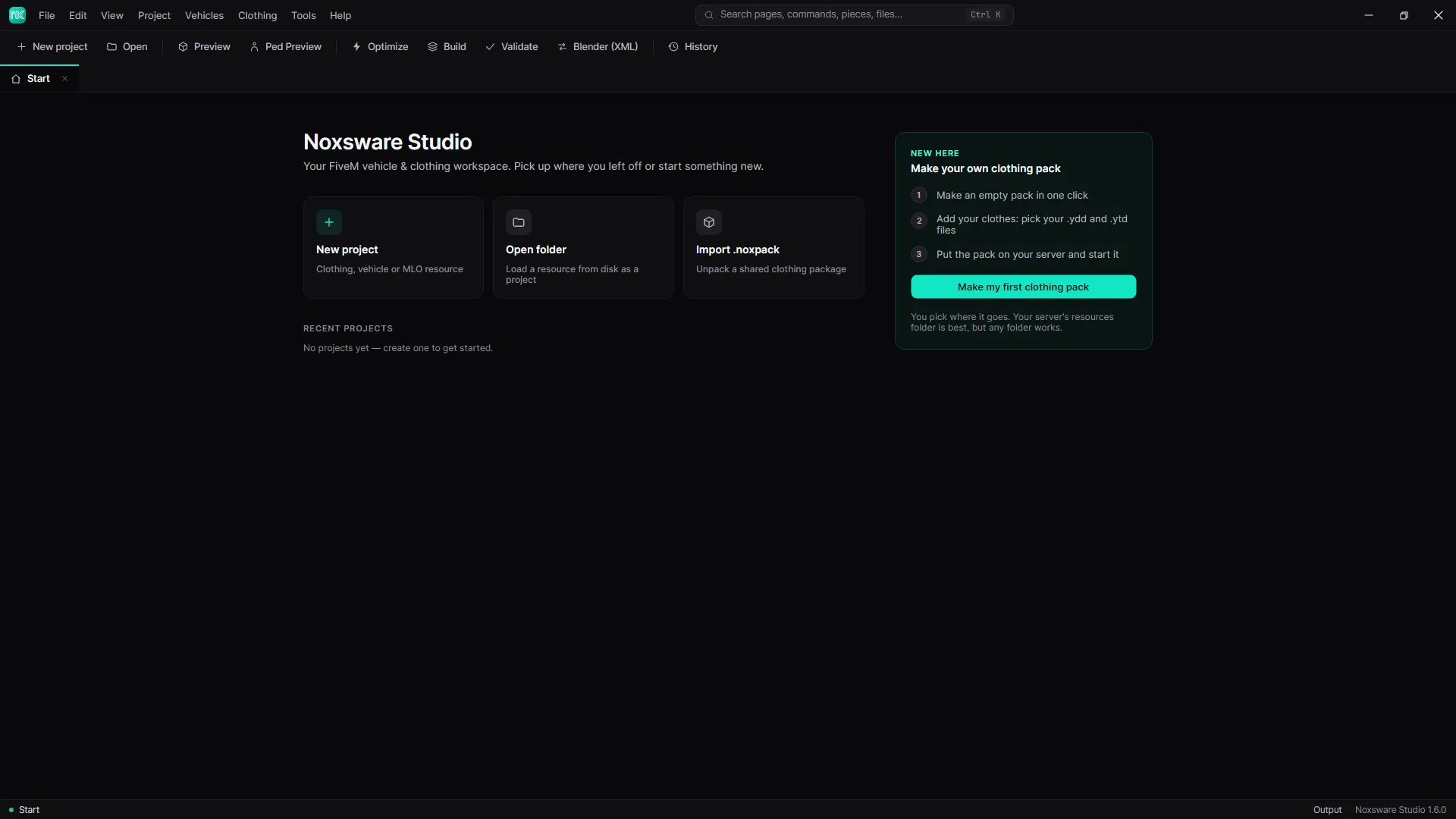 Video coming soon
What you need
Section titled “What you need”- Windows 10 or 11, 64-bit.
- An internet connection when you activate, and at least once every 7 days after that.
- A Discord account, to sign in to the client portal.
- GTA V on the same PC is optional. Some features use it: the ped body in Ped Preview, searching the game’s animation clips, and the merge in Map conflicts.
Get a plan
Section titled “Get a plan”Everything happens in the client portal at noxsware.com/portal.
-
Go to noxsware.com/portal and click Continue with Discord. Noxsware only reads your Discord name and avatar.
-
Under Choose a plan, pick Monthly or Yearly, then click Get Solo or Get Studio. Solo runs on one machine at a time, Studio on as many as you like. See Plans and billing.
-
On the Stripe checkout page, tick the box to accept the terms of sale and the license agreement, and pay.
-
You come back to the portal with Payment received — thank you. Your key shows up in Licenses within a few seconds. Refresh the page if it is not there yet.
Got a key from someone else? Paste it under Link a license and click Link license. See Client portal.
Download the studio
Section titled “Download the studio”At the top of the portal, the card Noxsware Studio shows the current version. Click Download. You get NoxswareStudio.exe, one self-contained file with no installer.
Put it somewhere it can stay, for example Documents\Noxsware, and start it from there. The studio updates itself later (see Updates).
Get past SmartScreen
Section titled “Get past SmartScreen”The first time you open the .exe, Windows may show Windows protected your PC. Windows shows this for new apps that are not yet downloaded by many people.
- Click More info.
- Click Run anyway.
Windows remembers the choice for this file.
Activate
Section titled “Activate”On the first start, the studio opens the Activate Noxsware Studio window.
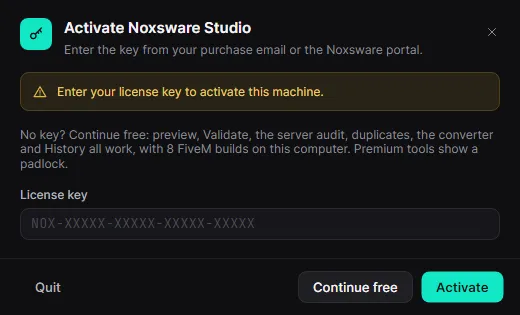
- In the portal, click Copy next to your key.
- Paste it into License key. The key looks like
NOX-XXXXX-XXXXX-XXXXX-XXXXX. - Click Activate.
The studio contacts the licensing server once, registers this PC as one of your machines, and opens. You don’t need the key on this PC again.
Typing the key by hand? Dashes and spaces don’t matter, and the letters O, I and L count as 0, 1 and 1.
Or continue free
Section titled “Or continue free”No key yet? Click Continue free. Preview, Validate, the server audit, duplicates, the converter (Blender XML) and History all work, and you get 8 FiveM builds on this computer. Premium tools show a padlock. The studio remembers this choice, so it opens straight away next time. See The free plan.
You can activate later from Help → License….
Work offline
Section titled “Work offline”After activation the studio confirms your license online each time it starts. Without a connection it keeps working for 7 days after the last confirmation. The License window shows how much time is left, for example offline — works for 5 more day(s) without a connection.
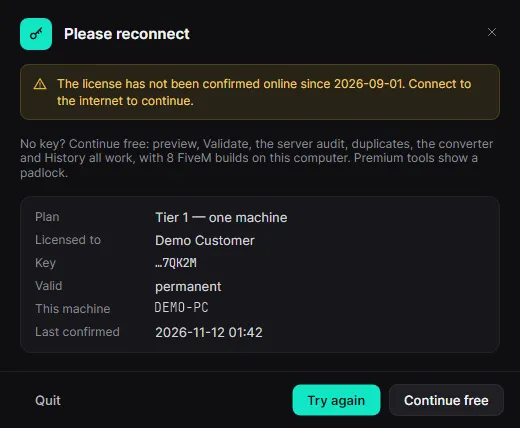
When the 7 days are up, the studio shows Please reconnect with the message The license has not been confirmed online since … Connect to the internet and click Try again.
The License window
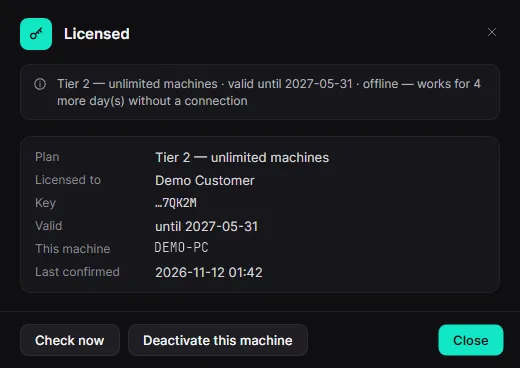
Section titled “The License window”Open it any time with Help → License…
| Row | What it shows |
|---|---|
| Plan | Your plan. The app shows Solo as Tier 1 — one machine and Studio as Tier 2 — unlimited machines. |
| Licensed to | Who the license belongs to. |
| Key | The last group of your key. |
| Valid | The date your current paid period ends. |
| This machine | This PC’s name, as the portal shows it. |
| Last confirmed | When the license was last confirmed online. |
- Check now confirms the license with the server right away, for example after you renewed or changed plan.
- Deactivate this machine frees this PC’s seat so you can use the license on another one. The studio closes afterwards. See Move to another PC.
On the free plan the window shows FiveM builds (for example 5 of 8 free builds left) and an Upgrade button.
Updates
Section titled “Updates”The studio updates itself. Once per start it asks noxsware.com for a newer version and downloads it in the background. When it is ready you see Noxsware Studio X is ready. It installs when you restart or close the Studio. Click Restart now, or keep working and it installs when you close the studio. Every update is checked against the Noxsware release signature before it runs.
After an update, a What’s new in Noxsware Studio window shows once. You can turn this off in Settings → Updates → Update automatically.
On the free plan the studio only tells you a new version is out (Noxsware Studio X is available.), with a Download button that opens the portal.
If activation fails
Section titled “If activation fails”| You see | What to do |
|---|---|
| That is not a valid license key — check it for typos. | Copy the key from the portal instead of typing it. |
| That license key does not exist. | Check that you copied the whole key. |
| This license is already in use on another machine… | Solo runs on one PC at a time. Free the old one: Move to another PC. |
| Could not reach the licensing server… | Check your internet connection, then try again. |
More messages and fixes: Troubleshooting.