

Enhanced readiness and builds
FiveM for GTA V Enhanced needs models and textures in its own format, and some things don’t run there yet. Enhanced readiness checks every resource on your server and puts the ones that won’t run first. Build clothing can then build or convert your clothing packs for Enhanced.
The report is based on Cfx.re’s documentation, not on a live Enhanced server.
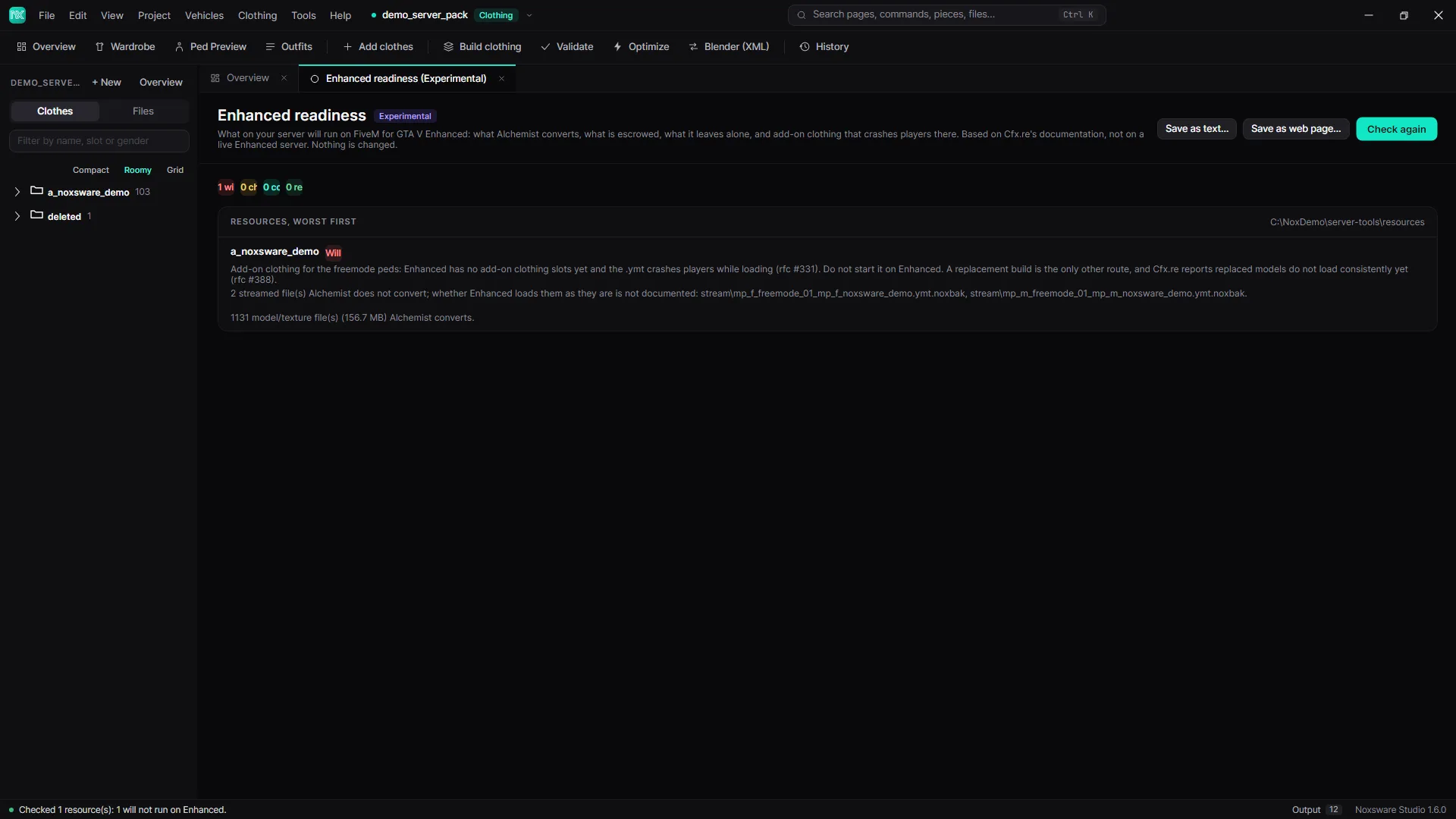
Check your server for Enhanced
Section titled “Check your server for Enhanced”- Open Tools → Server tools (Experimental) → Enhanced readiness (Experimental).
- Click Check my server. With no project open, click Pick folder… and pick your server’s resources folder.
- Read Resources, worst first. Each resource gets one verdict and a short list of reasons.
| Verdict | Meaning |
|---|---|
| Will not run on Enhanced | The resource is escrow-protected (a .fxap file or encrypted stream files), or it is add-on clothing for the freemode peds. Escrow is not implemented on Enhanced yet, and add-on clothing has no slots there. |
| Check on Enhanced | It streams files that Alchemist doesn’t convert (such as .ybn, .ycd, .ymap), files over 16 MB, or a stream_enhanced folder that is incomplete or holds files still in the Legacy format. Whether Enhanced loads these is not documented, so test them. |
| Converts with Alchemist | Its models and textures (.ydr, .ytd, .yft, .ypt, .ydd) need converting, and Alchemist can do it. |
| Ready | Nothing streamed needs converting, or it already has a complete stream_enhanced folder. |
Click Save as text… or Save as web page… to keep the report or send it on. Check again runs it again. The check changes nothing.
Know the clothing limit on Enhanced
Section titled “Know the clothing limit on Enhanced”FiveM Enhanced has no add-on clothing slots yet (Cfx.re, rfc #331). Add-on clothing for the freemode peds does not load there, and its .ymt crashes players while they load in. Cfx.re says a fix is coming in a patch.
Until then, the only route is to replace pieces of a game collection. Cfx.re confirms that replaced clothing does not load consistently yet (rfc #388). Legacy servers are not affected.
Build a pack for Enhanced
Section titled “Build a pack for Enhanced”Enhanced builds use Cfx.re’s converter, Alchemist. The build runs it and puts the result in a stream_enhanced folder, which Enhanced loads instead of stream. Alchemist skips escrow-protected files.
-
Open Build clothing and set Platform to FiveM (Enhanced) (Experimental) or FiveM (Legacy + Enhanced) (Experimental).
-
In the FiveM for GTA V Enhanced card, the studio looks for
AlchemistCli.exe. If it is not found, click Get Alchemist (Cfx.re Portal), sign in, download and unzip it, then click Choose AlchemistCli.exe…. -
Check Replace on Enhanced:. It names the game collection whose pieces your clothes replace:
basefor the game’s own clothes, or a DLC collection such asmp_f_heist. -
Build. The studio tells you that Enhanced gets a replacement, not an add-on pack, and asks you to confirm.
FiveM (Legacy + Enhanced) makes two resources: one with your name (the add-on pack, for Legacy servers) and one ending in _enhanced (for Enhanced servers). Start one of them, never both. FiveM (Enhanced) makes only the replacement, which also works as a replacement on Legacy.
When Cfx.re ships add-on clothing slots, tick Cfx.re has shipped add-on clothing slots: build the add-on pack for Enhanced to build a normal add-on pack instead.
If Alchemist was not found when you built, the result says the files are not converted yet, and README.txt in the build folder says how to convert them.
Every build uses one free build on the free plan. See Build and put it on your server for the other build options.
Convert a pack that is already built
Section titled “Convert a pack that is already built”Make a pack Enhanced-ready… in the same card converts a clothing resource you already have:
- Click Make a pack Enhanced-ready….
- Pick the clothing resource folder (the one with
streamin it). - Alchemist converts the models and textures into a new
stream_enhancedfolder. Files it doesn’t convert are copied as they are.
The stream folder, fxmanifest.lua and meta files are left as they are, so the pack still works on Legacy. If the folder already has a stream_enhanced folder, nothing is done: remove that folder first to make it again. Test the pack on an Enhanced server.