
Duplicate clothing
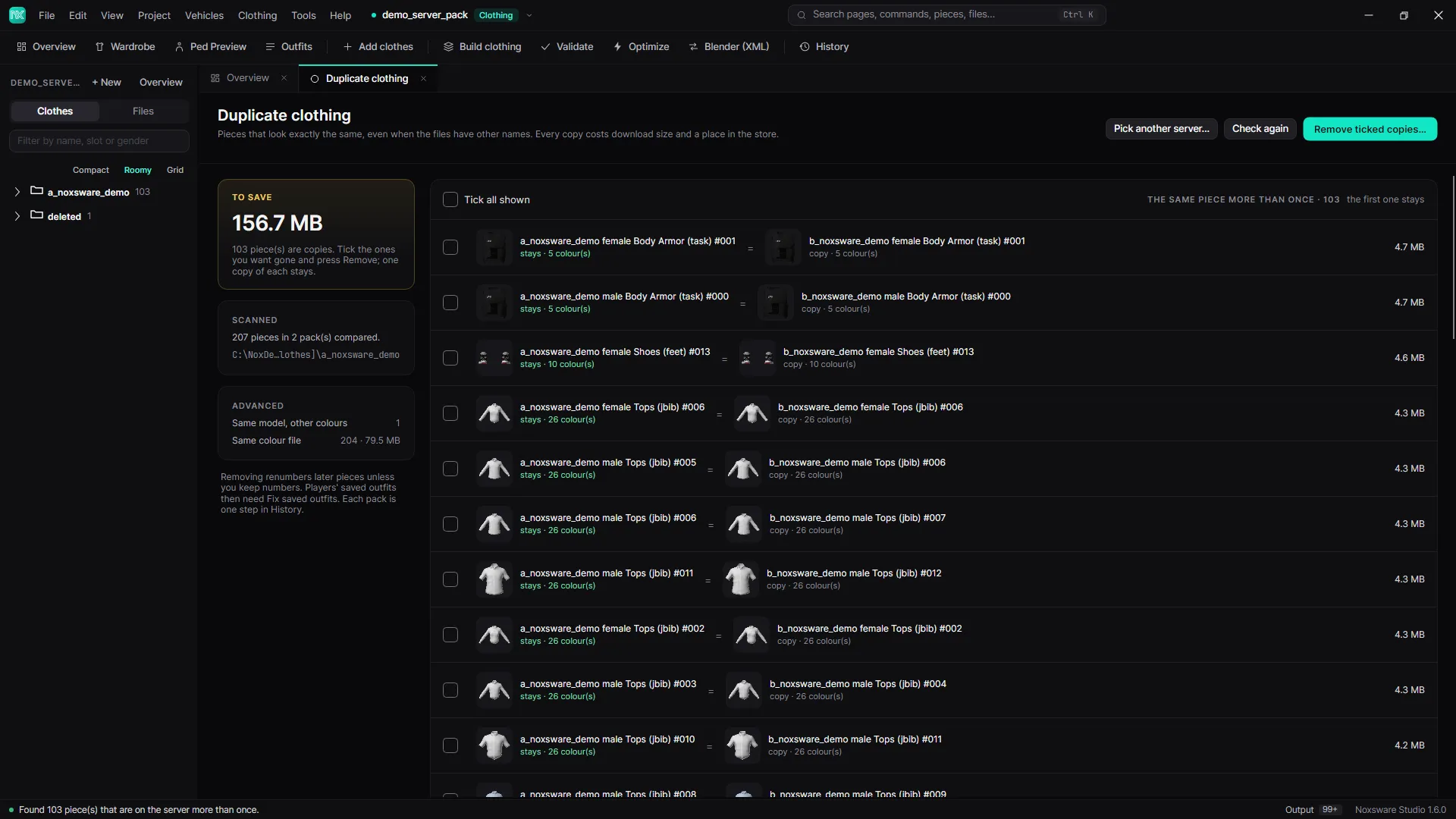
Packs bought from different places often contain the same pieces. Duplicate clothing finds every piece that is on your server more than once, even when the files have other names, and removes the copies you tick. Each copy costs download size and a place in the clothing store.
Duplicate clothing works on the free plan.
Find duplicates
Section titled “Find duplicates”- Open Tools → Server tools (Experimental) → Duplicate clothing.
- Click Find duplicates. With no project open, click Pick folder… first and pick your server’s resources folder.
- Wait while every model and colour file is read. On a big server this takes a couple of minutes. Nothing is changed.
The studio compares what the game draws, not the file names or bytes. Two files that are compressed differently, renamed, or have other names inside still match. It reads every clothing pack in the folder, started or not. Escrow-protected files can’t be read and are left out; the Scanned card says how many.
If nothing matches, the page says No duplicate pieces.
Remove the copies
Section titled “Remove the copies”THE SAME PIECE MORE THAN ONCE lists each piece with its copies. The first one in each group stays: the one in the pack that starts first, with the lowest number. The others are marked copy. The To save card shows how much you can save.
-
Tick the groups whose copies you want gone, or tick Tick all shown. Click Show 40 more to see more groups.
-
Click Remove ticked copies….
-
Choose how to remove them:
- Remove and renumber: the copies are deleted, and the pieces after each one move down one number. The packs get smaller and the menu has no gaps.
- Remove, keep numbers: the copies are emptied instead. Nothing moves, so players’ saved outfits stay right, but the empty entries stay in the clothing menu.
-
Check your server in game.
One copy of each piece always stays.
Undo a removal
Section titled “Undo a removal”Each pack you removed copies from is one step in History. Open Edit → History (undo / redo changes)… and click Undo on that step to bring the copies back with their old numbers.
See near-duplicates
Section titled “See near-duplicates”Open Advanced for two more lists. Nothing here is removed for you.
- Same model, other colours: one model shipped as several pieces with different colours. These could be one piece with more colours.
- Same colour file: a colour file that is exactly the same as another one.
Good to know
Section titled “Good to know”- Removing a copy uses the same delete as the wardrobe’s Delete & renumber… and Delete, keep numbers…. See The wardrobe and a piece.
- Server check suggests a duplicate search on any server with clothing packs.
Next: Fix saved outfits if you renumbered.