

Map conflicts
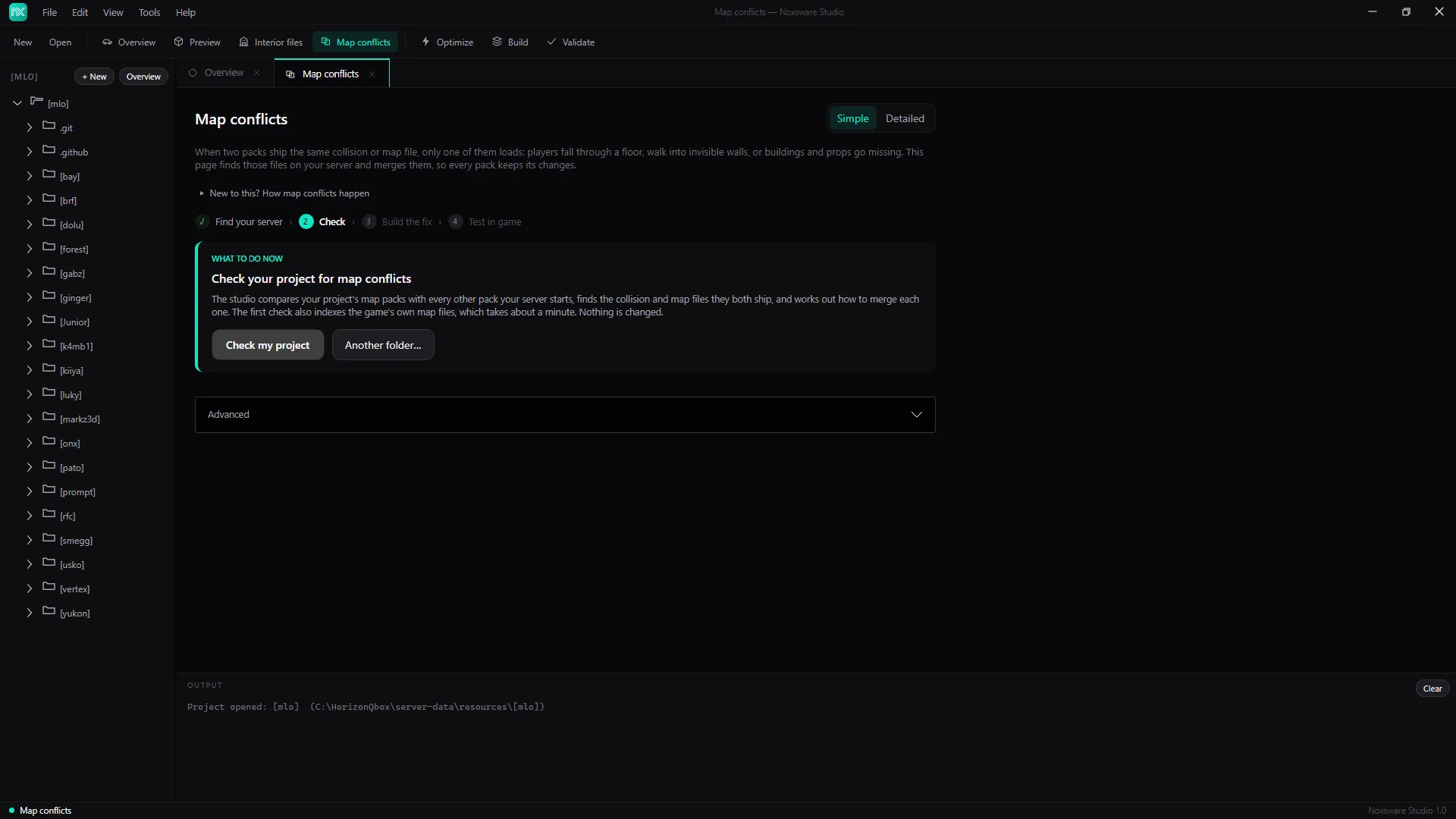
When two packs ship the same collision (.ybn) or map (.ymap) file, only one of them loads. Players fall through a floor, walk into invisible walls, or buildings and props go missing. Map conflicts finds those files on your server and merges them, so every pack keeps its changes.
Your packs are never edited. The result goes into one new resource, noxsware-compat, which starts last and wins. Removing it puts everything back.
The steps: Find your server › Check › Build the fix › Test in game.
1. Check
Section titled “1. Check”Open a project that lives in your server’s resources folder and click Check my project, or click Another folder… and pick the resources folder to check the whole server.
The first check also indexes the game’s own map files from your GTA V install. That takes about a minute and only happens once. Nothing is changed.
2. Read the result
Section titled “2. Read the result”- No map conflicts — nothing to do.
- N contested map file(s) — the tiles show how many are fixed automatically, how many need your choice, and how many packs are involved.
Automatic fixes are grouped:
- Collisions: what players and cars stand on and bump into.
- Map placements: which buildings, props and occluders stand where.
- Distant lights: the lights you see from far away, merged in near/distant pairs.
Some files can’t be combined, for example when a copy is escrow-locked, or a pack deletes something other map files depend on. For those, Pick whose version to use: choose the pack whose interior matters most on that spot, or Leave it (one pack wins) to keep today’s behaviour.
Switch to Detailed (top right) to see every file with its merge method, copies and pack, search and filter them, and Copy report.
3. Build the fix
Section titled “3. Build the fix”Click Build the fix and confirm. The studio:
- writes the merged files into
resources\[noxsware]\noxsware-compat\, - keeps a copy of
server.cfgasserver.cfg.noxbak, - adds
ensure noxsware-compatat the end ofserver.cfg.
4. Test in game
Section titled “4. Test in game”Map files load when the server starts. Restart the server and walk through the interiors that had problems.
Advanced → Remove the compatibility resource… deletes noxsware-compat and takes its line out of server.cfg. Building again replaces it.
Tick Include resources that server.cfg does not start under Advanced if your map packs are started some other way, or to check packs you haven’t turned on yet.